Wires.
Command: jwire
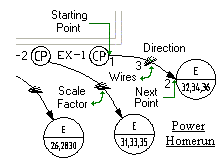
You can create wirings with this command.
To create wirings:
1. Current settings: Mode = Wire
2. Wire [Power/Lighting/Fire/CCTV/Data/Sound/Opcion] <Power>:
3. Power [Junction Box/Wiring/Homerun] <Wiring>:
4. Specify the section scale factor:
5. Specify the number wires in circuit:
6. Specify start point (1):
7. Specify next point (2):
8. Specify the wiring direction (3):
To create junction boxs:
1. From the menu options, select junction box:
2. The follow menu will appear:
1. Specify the section scale factor:
2. Specify start point (1):
3. Specify next point (2):
To create conduits:
1. From the menu options, select mode:
2. The follow menu will appear:
1. Appearance [Arc/Text/Line] <Arc>:
2. Current settings: Mode = Wire
3. Select appearance line.
1. Current settings: Mode = Conduit
2. Wire [Power/Lighting/Fire/CCTV/Data/Sound/Opcion] <Power>:
3. Power [Junction Box/Conduit/Homerun] <Conduit>:
4. Specify the section scale factor:
5. Specify the text:
6. Specify start point (1):
7. Specify next point (2):
8. Specify the conduit direction (3):
This function will allow you to create professional electric CAD drawings.
Electric Panels


